TL;DR
This blog explains how migrating from Cluster Autoscaler to Karpenter on Amazon EKS improves scaling speed, resource utilisation, and cost efficiency. It also introduces EKS Auto Mode, which builds on Karpenter to reduce operational overhead through automated scaling, patching, and upgrades—making EKS clusters more efficient and easier to manage.
Table of Contents
Introduction
In the previous blog “Enhance Kubernetes cluster performance and optimise costs with Karpenter”, we discussed: What is Karpenter?, its components, advantages, how it works, and how to deploy it in a AWS EKS cluster.
In this blog, let’s dive deeper into the following items:
- How to migrate from Cluster AutoScaler to Karpenter
- What is EKS Auto Mode (Advanced Karpenter Mode)?
- How to migrate from Karpenter to EKS Auto Mode and reap full benefits of cloud-managed services
To explain these points, let’s use a hypothetical example. Imagine two groups, Dogs and Cats are at war with each other. Each group has a leader who must securely and efficiently distribute war plans to their generals stationed across the globe. They decide to use a containerized application deployed in EKS for communication.
They share the same Amazon EKS cluster named “PetsCluster” for cost efficiency. Within this cluster, each of them has their own Kubernetes namespaces created to host their applications & for data isolation:
- fordogs – to deploy apps for dogs
- forcats – to deploy apps for cats
Even though both groups are focused on defeating each other, they still value AWS’s principle of frugality. Instead of duplicating infrastructure, they share a common namespace/infrastructure named platform to host logging, monitoring, and other shared services. This allows logical separation of workloads (forcats and fordogs) without compromising isolation between the two groups.
Full codebase: https://github.com/cevoaustralia/aws-eks-karpenter-and-automode
Cluster Auto-Scaler and its limitations
Currently, “PetsCluster” is using Cluster AutoScaler, which relies on AWS Auto Scaling Groups (ASGs). While it handles basic scaling, it has key limitations:
- One size must fit all – A Node Group can only use one instance type and size (e.g., t3.large). Workloads requiring other instance types cannot benefit without creating or modifying a separate Node Group.
- Overprovisioning – Cluster Autoscaler scales at the node group level, so GPU workloads force scaling of GPU node groups, causing non-GPU pods to land on GPU instances. Additionally, even small pods trigger provisioning of the full, often large, node group instance type, resulting in overprovisioning and higher infrastructure costs
- Underutilisation – If a tiny app runs on a t3.8xlarge, the server stays active until the app stops, leading to wasted capacity. There’s no optimization or consolidation.
- Operational overhead – New instance types require manual configuration changes, preventing users from quickly leveraging AWS innovations.
- Delayed provisioning – Cluster AutoScaler provisions via ASGs, which can be slow, leading to poor user experience under volatile load.
EKS Cluster Config: (PetsCluster)
					module "eks" {

  source  = "terraform-aws-modules/eks/aws"

  version = "~> 20.0"


  cluster_name                             = var.cluster_name #PetsCluster

  cluster_version                          = "1.32"

  cluster_endpoint_public_access           = true

  enable_cluster_creator_admin_permissions = true


  vpc_id     = module.vpc.vpc_id

  subnet_ids = module.vpc.private_subnets


  enable_irsa = true


}
EKS Managed Node Group Configs: (Platform, Forcats and ForDogs)
					eks_managed_node_groups = {

  platform = {

    min_size       = 2

    max_size       = 2

    desired_size   = 2

    instance_types = ["t3.medium"]


    labels = {

      "nodegroup/type" = "platform"

    }


    taints = {

      dedicated = {

        key    = "dedicated"

        value  = "platform"

        effect = "NO_SCHEDULE"

      }

    }

  }


  forcats = {

    min_size       = 1

    max_size       = 3

    desired_size   = 1

    instance_types = ["t3.small"]


    labels = {

      "nodegroup/type" = "forcats"

    }


    taints = {

      dedicated = {

        key    = "dedicated"

        value  = "forcats"

        effect = "NO_SCHEDULE"

      }

    }

  }


  fordogs = {

    min_size       = 1

    max_size       = 3

    desired_size   = 1

    instance_types = ["t3.small"]


    labels = {

      "nodegroup/type" = "fordogs"

    }


    taints = {

      dedicated = {

        key    = "dedicated"

        value  = "fordogs"

        effect = "NO_SCHEDULE"

      }

    }

  }

}
EKS Cluster Auto Scaling Config:
					resource "helm_release" "cluster_autoscaler" {

  name       = "cluster-autoscaler"

  repository = "https://kubernetes.github.io/autoscaler"

  chart      = "cluster-autoscaler"

  namespace  = "kube-system"

  version    = "9.29.0"

  timeout    = 600


  set {

    name  = "autoDiscovery.clusterName"

    value = var.cluster_name

  }


  set {

    name  = "awsRegion"

    value = var.region

  }


  set {

    name  = "rbac.serviceAccount.create"

    value = "true"

  }


  set {

    name  = "rbac.serviceAccount.name"

    value = "cluster-autoscaler"

  }


  set {

    name  = "rbac.serviceAccount.annotations.eks\\.amazonaws\\.com/role-arn"

    value = module.cluster_autoscaler_irsa.iam_role_arn

  }


  set {

    name  = "image.tag"

    value = "v1.30.0"

  }


  set {

    name  = "nodeSelector.nodegroup\\/type"

    value = "platform"

  }


  set {

    name  = "tolerations[0].key"

    value = "dedicated"

  }


  set {

    name  = "tolerations[0].value"

    value = "platform"

  }


  set {

    name  = "tolerations[0].operator"

    value = "Equal"

  }


  set {

    name  = "tolerations[0].effect"

    value = "NoSchedule"

  }


  depends_on = [module.eks]

}
Scenario 1: Generals from Cats & Dogs demand frugality & agility
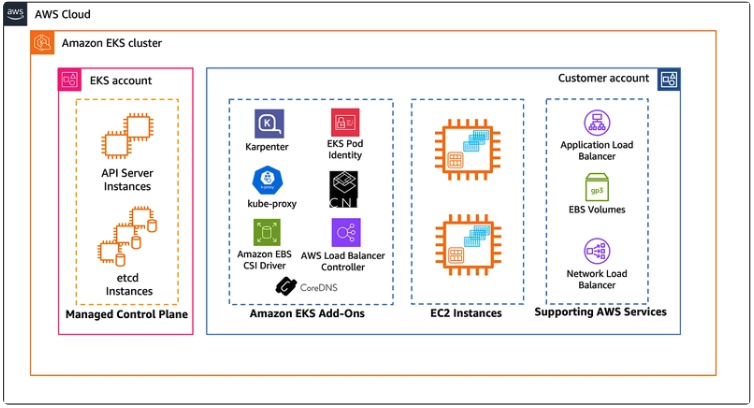
Modern apps come in different shapes and sizes. Auto scaling should provision the right instance types dynamically, rather than enforcing “one size fits all.”
Also, if 9–5, Mon–Fri is considered business hours, that’s only 23.8% of the week. The remaining 76.2% are non-business hours when non-production apps don’t need full capacity. By configuring appropriate disruption budgets, scaling down policies or shutting non-production workloads during off-business hours using AWS Instance Scheduler, customers can save up to ~75% in infrastructure costs .
Karpenter enables this by consolidating nodes—it moves workloads from underutilized / empty servers to other nodes in the cluster to maintain server utilization at ~80%. It then terminates idle servers saving cost.
Note: A dedicated platform Node Group (1 node) must host the Karpenter controller. Deploying Karpenter on Karpenter-managed nodes creates a chicken-and-egg problem.
Reason being, Karpenter controller responsible for dynamically provisioning and deprovisioning worker nodes based on pending pods and scheduling requirements. Because of this role, it cannot depend on itself to exist.
If the Karpenter controller pod were scheduled onto Karpenter-managed nodes, you would create a circular dependency (chicken-and-egg problem):
Let’s deploy Karpenter to “PetsCluster.”
Karpenter Setup Config:
					resource "helm_release" "karpenter" {

  name             = "karpenter"

  namespace        = "karpenter"

  create_namespace = true


  repository = "oci://public.ecr.aws/karpenter"

  chart      = "karpenter"

  version    = "1.6.1"

  timeout    = 600


  # Core settings

  set {

    name  = "settings.clusterName"

    value = var.cluster_name

  }


  set {

    name  = "settings.clusterEndpoint"

    value = module.eks.cluster_endpoint

  }


  set {

    name  = "serviceAccount.annotations.eks\\.amazonaws\\.com/role-arn"

    value = module.karpenter_irsa.iam_role_arn

  }


  # Controller configuration

  set {

    name  = "controller.resources.requests.cpu"

    value = "1"

  }


  set {

    name  = "controller.resources.requests.memory"

    value = "1Gi"

  }


  set {

    name  = "controller.resources.limits.cpu"

    value = "1"

  }


  set {

    name  = "controller.resources.limits.memory"

    value = "1Gi"

  }


  # Node selector for platform nodes

  set {

    name  = "nodeSelector.nodegroup\\/type"

    value = "platform"

  }


  # Tolerations for platform nodes

  set {

    name  = "tolerations[0].key"

    value = "dedicated"

  }


  set {

    name  = "tolerations[0].value"

    value = "platform"

  }


  set {

    name  = "tolerations[0].operator"

    value = "Equal"

  }


  set {

    name  = "tolerations[0].effect"

    value = "NoSchedule"

  }


  depends_on = [module.eks, module.karpenter_irsa]

}
Karpenter NodePool Config:
					---

apiVersion: karpenter.sh/v1

kind: NodePool

metadata:

  name: platform

spec:

  template:

    metadata:

      labels:

        "nodegroup/type": "platform"

    spec:

      nodeClassRef:

        group: karpenter.k8s.aws

        kind: EC2NodeClass

        name: platform

      requirements:

        - key: "karpenter.k8s.aws/instance-category"

          operator: In

          values: ["t", "m"]

        - key: "karpenter.k8s.aws/instance-cpu"

          operator: In

          values: ["2", "4", "8"]

      taints:

        - key: "dedicated"

          value: "platform"

          effect: "NoSchedule"

  limits:

    cpu: 100

  disruption:

    consolidationPolicy: WhenEmptyOrUnderutilized

    consolidateAfter: 30s


---

apiVersion: karpenter.sh/v1

kind: NodePool

metadata:

  name: forcats

spec:

  template:

    metadata:

      labels:

        "nodegroup/type": "forcats"

    spec:

      nodeClassRef:

        group: karpenter.k8s.aws

        kind: EC2NodeClass

        name: forcats

      requirements:

        - key: "karpenter.k8s.aws/instance-category"

          operator: In

          values: ["c", "m", "r"]

        - key: "karpenter.k8s.aws/instance-cpu"

          operator: In

          values: ["4", "8", "16"]

      taints:

        - key: "dedicated"

          value: "forcats"

          effect: "NoSchedule"

  limits:

    cpu: 500

  disruption:

    consolidationPolicy: WhenEmptyOrUnderutilized

    consolidateAfter: 30s


---

apiVersion: karpenter.sh/v1

kind: NodePool

metadata:

  name: fordogs

spec:

  template:

    metadata:

      labels:

        "nodegroup/type": "fordogs"

    spec:

      nodeClassRef:

        group: karpenter.k8s.aws

        kind: EC2NodeClass

        name: fordogs

      requirements:

        - key: "karpenter.k8s.aws/instance-category"

          operator: In

          values: ["c", "m", "r"]

        - key: "karpenter.k8s.aws/instance-cpu"

          operator: In

          values: ["4", "8", "16"]

      taints:

        - key: "dedicated"

          value: "fordogs"

          effect: "NoSchedule"

  limits:

    cpu: 500

  disruption:

    consolidationPolicy: WhenEmptyOrUnderutilized

    consolidateAfter: 30s
Karpenter NodeClass Config:
					---

apiVersion: karpenter.k8s.aws/v1

kind: EC2NodeClass

metadata:

  name: platform

spec:

  amiFamily: AL2

  amiSelectorTerms:

    - alias: al2@latest

  role: ${instance_profile_name}

  subnetSelectorTerms:

    - tags:

        "kubernetes.io/role/internal-elb": "1"

  securityGroupSelectorTerms:

    - name: "${cluster_name}-node-*"

  tags:

    "karpenter.sh/discovery": "${cluster_name}"

    "nodegroup/type": "platform"

    "Name": "${cluster_name}-platform-karpenter"

  userData: |

    #!/bin/bash

    /etc/eks/bootstrap.sh ${cluster_name}


---

apiVersion: karpenter.k8s.aws/v1

kind: EC2NodeClass

metadata:

  name: forcats

spec:

  amiFamily: AL2

  amiSelectorTerms:

    - alias: al2@latest

  role: ${instance_profile_name}

  subnetSelectorTerms:

    - tags:

        "kubernetes.io/role/internal-elb": "1"

  securityGroupSelectorTerms:

    - name: "${cluster_name}-node-*"

  tags:

    "karpenter.sh/discovery": "${cluster_name}"

    "nodegroup/type": "forcats"

    "Name": "${cluster_name}-forcats-karpenter"

  userData: |

    #!/bin/bash

    /etc/eks/bootstrap.sh ${cluster_name}


---

apiVersion: karpenter.k8s.aws/v1

kind: EC2NodeClass

metadata:

  name: fordogs

spec:

  amiFamily: AL2

  amiSelectorTerms:

    - alias: al2@latest

  role: ${instance_profile_name}

  subnetSelectorTerms:

    - tags:

        "kubernetes.io/role/internal-elb": "1"

  securityGroupSelectorTerms:

    - name: "${cluster_name}-node-*"

  tags:

    "karpenter.sh/discovery": "${cluster_name}"

    "nodegroup/type": "fordogs"

    "Name": "${cluster_name}-fordogs-karpenter"

  userData: |

    #!/bin/bash

    /etc/eks/bootstrap.sh ${cluster_name}
Scenario 2: Generals demand “All hands on deck” using EKS Auto Mode
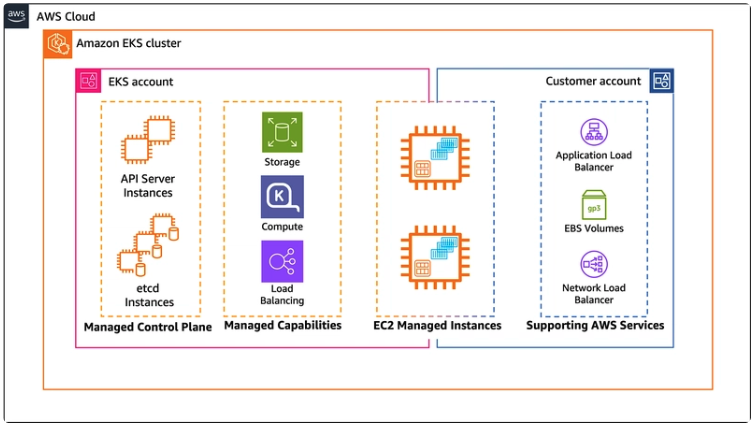
Karpenter improves frugality and agility, but operational overhead remains—security patching, upgrades, and maintenance are still needed for better security posture. This is where EKS Auto Mode comes in. It uses Karpenter behind the scenes, but with additional automation:
- Streamlined cluster management – Production-ready EKS clusters with minimal overhead, like Elastic Beanstalk.
- Application availability – Dynamically adds/removes nodes per workload demand.
- Efficiency – Consolidates workloads, removes idle nodes, and reduces cost.
- Security – Nodes are recycled every 21 days (can be reduced), aligning with security best practices.
- Automated upgrades – Keeps clusters/nodes up to date while respecting PDBs and NDBs.
- Managed components – Includes DNS, Pod networking, GPU plug-ins, health checks, and EBS CSI out-of-the-box.
- Customizable NodePools – Still allows defining custom storage, compute, or networking requirements.
- EKS Auto Mode is enabled by setting `compute_config.enabled = true`.
EKS Cluster Config with Auto Mode:
					module "eks" {

  source  = "terraform-aws-modules/eks/aws"

  version = "~> 20.0"


  cluster_name                             = var.cluster_name

  cluster_version                          = "1.32"

  cluster_endpoint_public_access           = true

  enable_cluster_creator_admin_permissions = true


  vpc_id     = module.vpc.vpc_id

  subnet_ids = module.vpc.private_subnets


  enable_irsa = true


  compute_config = {

    enabled = true

  }

}
EKS with Karpenter v/s EKS Auto Mode
Both Managed EKS with Karpenter & Amazon EKS Auto Mode offer a powerful solution for managing Kubernetes clusters.
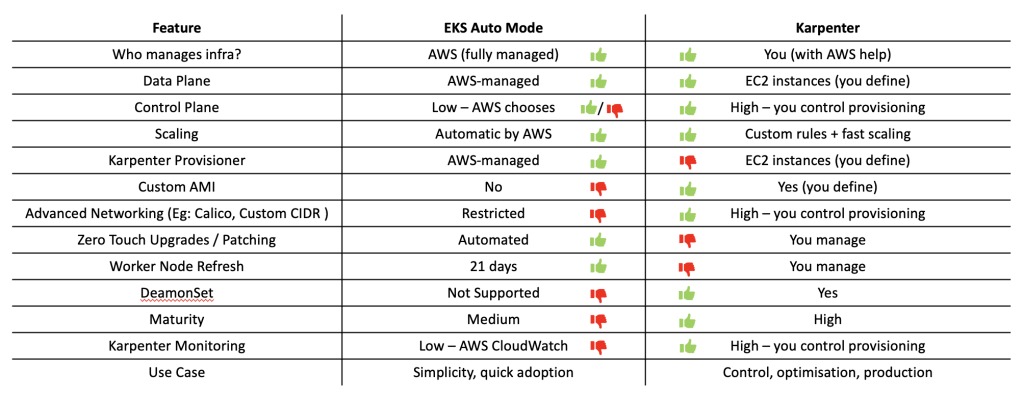
Choose Managed EKS with Karpenter option if you need:
- Control over Data Plane
- Custom AMI
- Install specific Agents or software requiring DaemonSet
- Custom Networking
- Granular control over patching & upgrades
Choose EKS Auto Mode if:
- Reduce operational overhead on upgrade and patching
- Don’t require granular control over the AMI, Custom Networking, upgrade and patching
Conclusion
In conclusion, now both Dogs and Cats generals have EKS clusters with auto-mode enabled that automatically scales, patches, and provides enhanced security to workloads without manual intervention.
Migrating from Cluster AutoScaler to Karpenter was the tectonic shift that optimized cluster efficiency. Karpenter, originally built by AWS, is now an open-source project maintained by the community.
As the proverb goes: “Trust, but verify.” While Karpenter is powerful, it shouldn’t be treated as a black box. The last thing anyone wants is a production outage because Karpenter decided to consolidate or terminate nodes during business hours.
So, in the next blog, we’ll explore observability for Karpenter forwarding Karpenter controller logs to Grafana and building dashboards to monitor its actions.

Gokul is a passionate technologist with approximately 14 years of IT experience. He has held diverse roles, including DevOps Engineer, Technical Architect, Solution Architect, and Team/Project Manager. With a strong background in both on-premises and cloud environments (Azure/AWS), he has successfully led and delivered robust, cost-effective end-to-end solutions.