Cloud cost tools like Infracost and AWS Cost Explorer are powerful, but they only kick in after the code is written or the infrastructure is running. By then, the expensive decisions are already locked in. The AWS Pricing Calculator MCP Server simplifies bringing cost estimation to the architecture design phase, where a single decision can save (or waste) thousands per month. This post explores how it works, how to set it up, and why shifting cost feedback left to the design stage changes the game for architects and engineering teams.
TL;DR: The AWS Pricing Calculator MCP Server lets AI coding assistants (Kiro, Claude Desktop, Cursor, VS Code) create AWS cost estimates from natural language — at design time, before any infrastructure code exists. Today’s cost tools (Infracost at the PR stage, Cost Explorer after deployment) are reactive, they tell you what things cost after the decisions are made. This tool shifts cost feedback left to the architecture phase, where decisions have the highest cost leverage and changes are cheapest. No AWS credentials required. Install with a single npx command. Get a shareable calculator.aws URL in seconds.
Table of Contents
The Problem: Cost Feedback Comes Too Late
Here’s a pattern most cloud teams know too well:
1. An architect designs a system on a whiteboard.
2. Engineers implement it over weeks.
3. Someone opens a pull request.
4. A cost tool (maybe Infracost, maybe a reviewer’s gut feel) flags that the architecture will cost $14,000/month instead of the $3,000 budget.
5. The team rearchitects after weeks of implementation work.
Or worse, nobody catches it until after deployment:
6. The infrastructure goes live.
7. Three weeks later, AWS Cost Explorer shows a spike.
8. The FinOps team raises a flag. Now you’re optimising under production pressure.
The cloud ecosystem has built solid tooling for steps 3–8. Infracost catches cost impact at the PR stage. AWS Cost Explorer and AWS Budgets alert you after deployment. Trusted Advisor flags idle resources. Compute Optimizer recommends better instance types. AWS Billing & Cost Management MCP lets you query what you’ve already spent. These are all valuable, but they all share one trait: they react to decisions that have already been made.
The gap is at step 1. The architecture design phase — where an architect decides between Aurora Serverless v2 and RDS Provisioned, or between Fargate and EC2 with Savings Plans — has no automated cost feedback. That’s where this tool fits.
What if the architect could check the cost before anyone wrote a single line of code?
That’s the shift-left gap this post is about, and why the AWS Pricing Calculator MCP Server exists.
The Full Cost Feedback Lifecycle (and the Missing Piece)
Cloud teams today have cost tools at several stages,but not where it matters most:
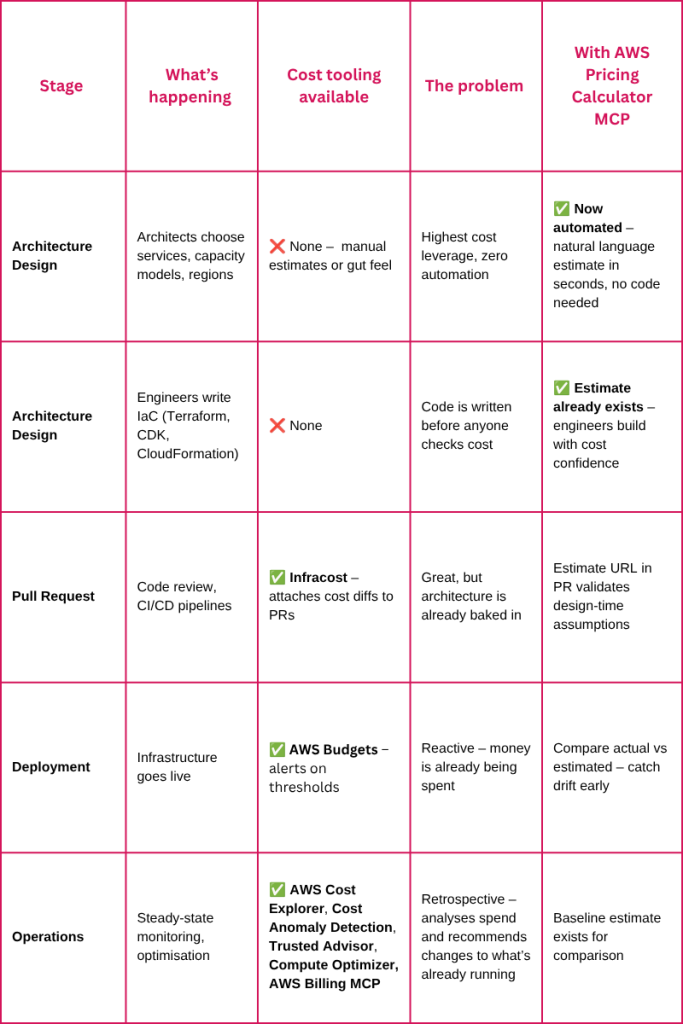
Each tool is excellent at its stage. Infracost tells you what a PR will add to your bill. Cost Explorer tells you where last month’s $47,000 went. AWS Budgets alert you when spending crosses a threshold.
But none of them answer the architect’s question at the start of the process: “I’m thinking about this design…what will it cost?”
The AWS Pricing Calculator MCP Server fills that first gap. It brings cost estimation into the IDE at the moment an architect is designing the solution — before any infrastructure code exists, before any PR is opened, and long before Cost Explorer has anything to report.
The Shift-Left Cost Estimation Model
Here’s the flow, from idea to shareable estimate:
Step 1: Architect describes the architecture in natural language
“Estimate the cost of a three-tier web app in ap-southeast-2 with an ALB, 3 Fargate tasks (1 vCPU, 2GB), an RDS PostgreSQL db.r6g.large Multi-AZ with 500GB storage, and a NAT Gateway processing 100GB/month.”
Step 2: The MCP server searches, configures, and validates
The server runs as a local process spawned by your IDE. It talks to the same public, unauthenticated CloudFront endpoints that calculator.aws uses — no IAM roles, no account access, no credentials. Behind the scenes, the agent:
- Calls search_services to find the right AWS services (~436 available)
- Calls get_service_fields to discover required fields and catalog hints
- Calls build_estimate with validated configurations — task count, memory, storage size, and capacity mode
- Runs a lint preflight to catch silent failures (the $0/month problem — more on this below)
- Returns a shareable calculator.aws URL
Step 3: Architect iterates
If the number comes back too high, iterate right there:
“What if we use a single-AZ RDS instance and t4g.medium instead?”
Another estimate in seconds. Compare. Decide. Document the cost assumption. Then hand off to engineering.
The entire flow takes seconds,compared to 15–30 minutes of manual configuration across multiple service forms. No Terraform. No CloudFormation. No infrastructure code at all.
Where this fits in practice
- Design reviews:Generate cost estimates for each architecture option. Paste shareable URLs into the design document. The review board sees real numbers, not guesses.
- Sprint planning:Before committing to a feature that needs new infrastructure, validate it’s within budget. Explore alternatives before the sprint starts.
- Architecture Decision Records (ADRs):Include the estimate URL as evidence for why you chose Option B over Option A. Verifiable, shareable, based on real AWS pricing.
- Client proposals and pre-sales:For consultancies and MSPs, generate estimates live during discovery workshops instead of “we’ll get back to you with pricing.”
Why This Matters More Than Another MCP Blog
There are plenty of MCP blog posts showing how to connect AI assistants to external tools. The unique value here isn’t “look, another MCP integration” — it’s the workflow position this tool occupies.
This is the only tool in the ecosystem that gives architects and tech leads a cost feedback loop at the design stage — powered by natural language, with no infrastructure code required, and no AWS credentials needed.
The tools are complementary, not competing. A mature cost-aware workflow uses all of them at the right stage:

Setup (5 Minutes)
You need Node.js and an MCP-capable client (Kiro, Claude Desktop, Cursor, or VS Code).
Add this to your MCP client configuration:
{
  "mcpServers": {
    "aws-pricing-calculator-mcp-server": {
      "command": "npx",
      "args": ["-y", "sample-aws-pricing-calculator-mcp@latest"]
    }
  }
}
Client | Configuration location |
Kiro | ~/.kiro/settings/mcp.json |
Claude Desktop | claude_desktop_config.json → mcpServers section |
Cursor | Settings → MCP configuration |
VS Code | VS Code MCP configuration for chat sessions |
Restart your client. Done. No build step, no cloning, no AWS credentials.
The MCP Tools Available
The server exposes eight tools. In practice, you write natural language and the agent chooses the right sequence:
Tool | What it does |
search_services | Find AWS services by name (~436 available) |
get_service_fields | Get required fields, valid options, and catalog hints |
create_estimate | Create an empty estimate |
add_service | Add services with validated configs (auto-corrects typos) |
validate_estimate | Dry-run preflight — catches silent failures before saving |
build_estimate | One-shot: create + add + validate + save → returns URL |
export_estimate | Save and return the calculator.aws link |
import_estimate | Pull any existing estimate URL into JSON or Markdown |
For quick estimates, build_estimate does everything in one call. For complex architectures, use the step-by-step tools to iterate.
The Verified Configs Catalog
The AWS Pricing Calculator silently requires fields that the UI doesn’t flag as mandatory. You configure a service, save it, and the estimate shows $0/month.
The MCP server includes a Verified Configs Catalog — 18 curated entries for high-impact services that declare:
- minimalConfig — the smallest configuration that produces a real, non-zero estimate
- required[] — fields the pricing engine actually needs (broader than the manifest declares)
- traps[] — gotchas the manifest cannot express
Services covered include: Lambda, RDS PostgreSQL, ALB, Fargate, EC2, NAT Gateway, Transit Gateway, CloudTrail, Direct Connect, Cognito, S3, SNS, SageMaker, Bedrock, AppSync, and Step Functions.
Uncatalogued services still work — the agent reads the live manifest. The catalog prevents the $0 surprise for the services you’ll estimate most often.
Deployment Options
The MCP server supports two modes depending on your team’s needs:
- Local (stdio) mode — The default. Your IDE starts the server automatically during a chat session and stops it when the IDE closes. No ports, hosting, or infrastructure needed. Best for individual architects and developers.
- HTTP mode — For teams that need a shared, persistent server. Multiple users connect to one hosted instance, and estimates can be backed by DynamoDB for persistence across restarts.
Known Limitations
Limitation | Implication |
CloudFront APIs are undocumented | May change without notice |
No local cost calculation | AWS computes pricing when the link is opened |
Partial catalog coverage | Uncatalogued services may hit $0 edge cases |
In-memory store lost on restart | Export before closing your IDE, or use HTTP mode with DynamoDB |
FAQs
Do I need AWS credentials? No. The server uses the same public endpoints as the calculator.aws website. No IAM roles, no account access, no billing permissions required.
Does it calculate costs locally? No. It builds, validates, and saves the estimate. AWS calculates the actual pricing when someone opens the shareable calculator.aws link.
Which IDE clients are supported? Any MCP-capable client works — Kiro, Claude Desktop, Cursor, and VS Code.
How is this different from Infracost or AWS Cost Explorer? They operate at different stages of the lifecycle. Infracost analyses Terraform/OpenTofu code at the PR stage — it requires infrastructure code to already exist. AWS Cost Explorer analyses actual spending after resources are deployed. This tool operates earlier — at the architecture design stage — before any code exists and before anything is deployed. They’re complementary: use this to validate costs during design, Infracost to catch cost drift in PRs, and Cost Explorer to monitor real spend in production.
When should teams use HTTP mode? Use HTTP mode when multiple users need to share one server instance, or when you want persistent estimates backed by DynamoDB that survive IDE restarts.
What happens if a service isn’t in the Verified Configs Catalog? It still works. The agent reads the live AWS manifest directly. The catalog just adds extra safety for the 18 highest-impact services where the manifest under-declares required fields.
The Bottom Line
The AWS Pricing Calculator MCP Server isn’t just another MCP integration to demo. It’s the missing piece in the cloud cost feedback loop, the tool that lets architects validate costs at the moment they’re making the decisions that determine those costs.
Today’s cost tools are reactive: Infracost tells you what your PR will cost. Cost Explorer tells you what you already spent. This tool tells you what your idea will cost, before you’ve written a line of code or deployed a single resource.
That’s the difference between catching a $14,000/month surprise in code review (or worse, in next month’s bill) and never making that design choice in the first place.
It’s also worth checking out the AWS Pricing MCP Server when your goal is to query real-time unit pricing, compare prices across regions, or analyse pricing attributes through the AWS Price List API. That server complements this one: the Pricing Calculator MCP Server builds shareable forward-looking estimates, while the AWS Pricing MCP Server is better suited to pricing discovery, product availability, and detailed unit-price analysis.
Try it: github.com/aws-samples/sample-aws-pricing-calculator-mcp

Meiyappan Chidambaram (Mei) is a Senior Cloud Consultant at Cevo Australia with over 8+ years of experience in AWS infrastructure, DevOps, and cloud migration. He holds multiple certifications including AWS Solutions Architect Professional, DevOps Engineer Professional, Security Specialty, CKA, and Terraform Associate. At Cevo, he helps enterprise clients migrate to AWS, modernise their infrastructure, adopt cloud-native patterns, and shift quality practices left — from infrastructure as code and CI/CD to security, observability, and cost estimation — so teams catch problems at the design stage, before anyone has written a line of code.