
How to Secure your Instance Metadata Service on AWS Using AWS Systems Manager Run Commands
In the final part of this series, I will demonstrate how to configure EC2 Instance Metadata Service (IMDS) through the use of AWS Systems Manager (SSM) Run Commands using a tag based approach to target EC2 instances to run our IMDS commands against. In addition, I will look at automating this process using EventBridge to maintain IMDS on a periodic basis.
Cevo Achieves AWS Migration Competency and Amazon EC2 for Microsoft Windows Server Service Delivery Program Status

Cevo enables continuous evolution in enterprises through Application Modernization and Windows Migration services of legacy workloads.
Migrating to the cloud enables businesses to make substantial IT cost savings, reducing the risk of project failure, increasing security and becoming more agile to drive future innovation.
How to Extend IAM’s Switch Role Limit using AWS Extend Switch Roles
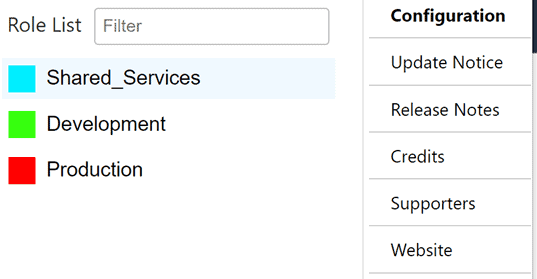
In this blog post, I will be highlighting a browser extension that I have found to be extremely beneficial in managing access to multiple AWS Cloud Accounts. Introducing AWS Extend Switch Roles, a browser extension that allows users to switch between roles and customize its appearance all through the tool’s configuration window.
[A Well Architected Walkthrough] Operations 1 – How do you determine what your priorities are?

We start working through the questions of a Well Architected Review with the “Operational Excellence” pillar and how to identify what your priorities are.
STARTING FROM SCRATCH – HOW TO START WITH A NEW MASTER BILLING ACCOUNT

Recently, I did something I haven’t done in quite some time….. create a new Master Billing Account for a customer. This actually tripped me up a little bit as it raised a question I haven’t had to think about due to the wonderful world of automation; “What do I need to do to a new AWS Master Billing Account?”
re:Invent 2020 wrap-up: Andy Jassy Keynote

A quick overview and wrap-up of the major themes and product launches from the Andy Jassy Keynote at AWS re:Invent 2020.
Performing Rolling Updates in Terraform with CloudFormation

In this post we look at one of the most common problems Terraform encounters – managing rolling updates to AWS AutoScaling Groups – and how you can utilise CloudFormation to solve this.
Remoting into EC2s with SSM Session Manager
Simple Systems Manager (SSM) in AWS has a feature called Session Manager, which allows you to remote into EC2 instances on Windows and Linux command line through the browser
Are You Well Operated?

In this post, we explore how the WAF can go beyond the bounds of being a pure application architecture assessment to drive a discussion around improved operational insight and observability of system health and performance.
Amazon Macie, Trusted Advisor & new EC2 instance types – AWS Cost Management Update

Given the speed and pace of new releases coming out of the AWS services factory, one could be forgiven for struggling to keep up.