TL;DR
This guide shows how to use AWS DMS CDC to replicate SQL Server data to S3 in near real time using AWS CDK. We have used AWS DMS CDC to replicate SQL Server tables into S3 as Parquet files full load for the initial snapshot, then continuous Change Data Capture for ongoing deltas. The entire setup is codified in AWS CDK using L1 constructs, with credentials in Secrets Manager, config-driven table mappings, and date-partitioned output.
Table of Contents
AWS DMS CDC vs Traditional ETL for SQL Server
Every enterprise has a SQL Server database locked away from the modern analytics stack. You need that data in your lake – fresh, reliable, and without brittle batch ETL.
AWS DMS CDC solves this by reading the SQL Server transaction log and streaming only the changes. Instead of re-reading entire tables nightly, you get:
- Full Load – a one-time historical snapshot on day one
- Ongoing CDC – a continuous stream of inserts, updates, and deletes
- Minimal source load – DMS reads the transaction log, not the tables themselves
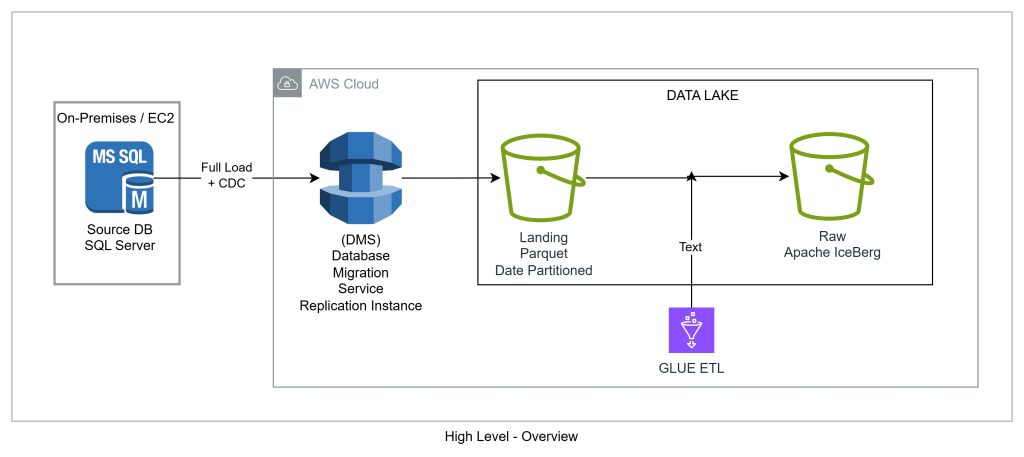
Scheduled batch ETLs would not work at scale, DMS with CDC is the pattern that stuck.
SQL Server to S3 AWS DMS Architecture
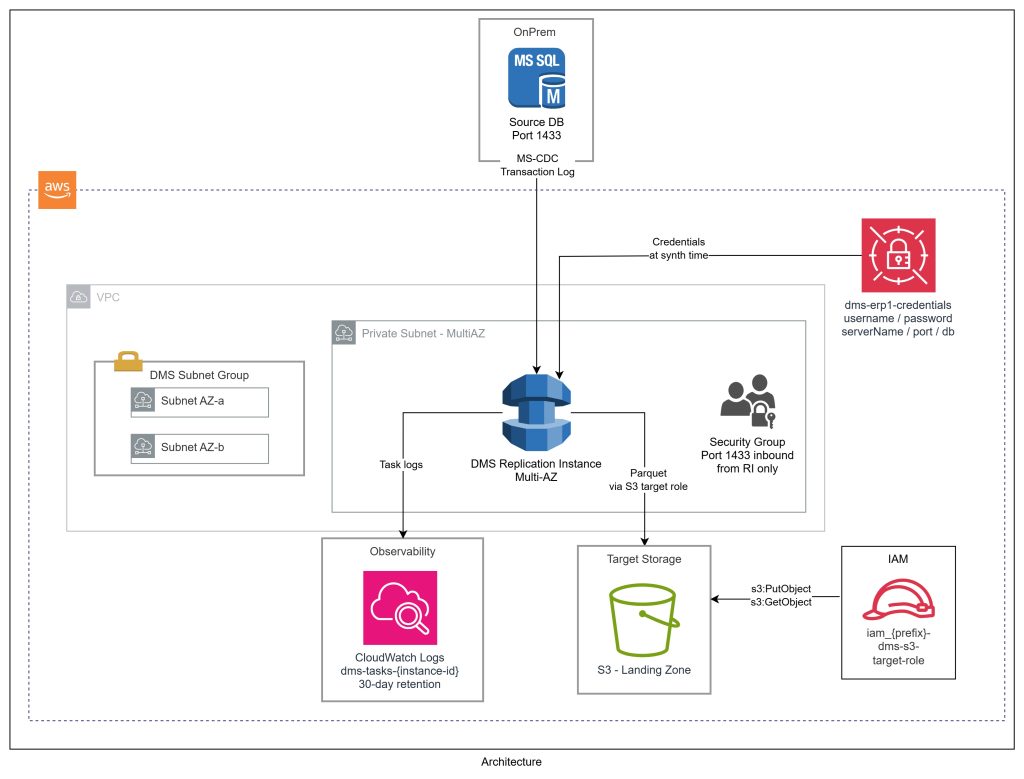
Our architecture has four layers:
- Source: SQL Server (On-Premises or EC2)– Runs inside a VPC (or accessible viaDirect Connect / VPN) – Uses MS-CDC (Microsoft’s native CDC) – not fn_dblog directly – fn_dblog requires sysadmin; MS-CDC only needs db_datareader, VIEW DATABASE STATE, and a small set of server-level grants – Automatic table-level CDC via setUpMsCdcForTables=true
- DMS Replication Instance– Sits in a private subnet, connects to SQL Server on port 1433, writes to S3 – Sized by data volume –dms.t3.medium or dms.r5.large for most workloads
- Target: S3 Landing Zone (Parquet)– Parquet format, Gzip compression, date-partitioned byYYYYMMDD – Includes dms_timestamp and operation column (I, U, D) – This is the bronze layer in the lakehouse medallion architecture
- Observability: CloudWatch– Logs written todms-tasks-<replication-instance-identifier> – Log group provisioned explicitly in CDK with retention policies enforced from day one
Preparing SQL Server for AWS DMS CDC
Most blog posts gloss over this step – but it causes the most friction in real projects. Key points:
- Your SQL Server must be ready before any CDK stack is deployed
- DMS does not need sysadmin
- You’ll need a conversation with your DBA – here’s exactly what to ask for
The Setup Script
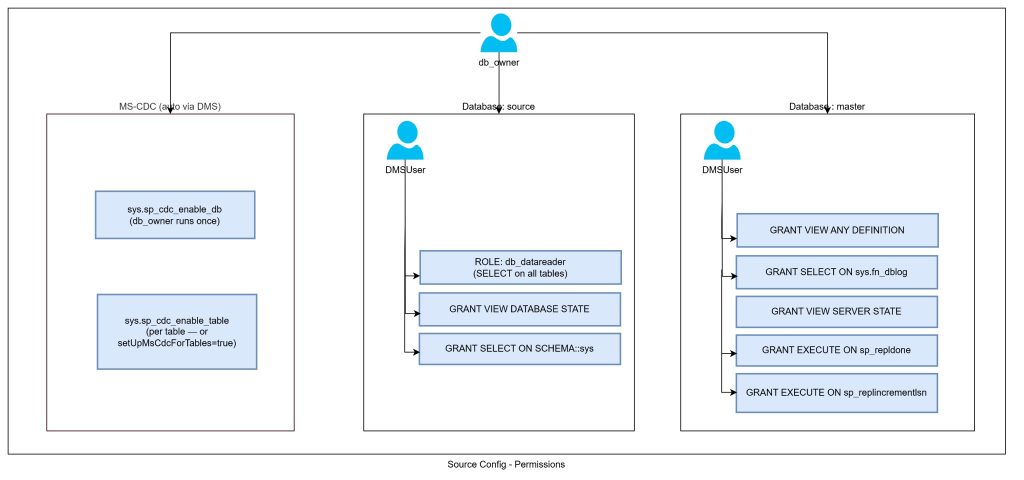
Run this on your SQL Server instance. Each grant is explained below.
					-- ============================================================
-- Step 1: Map the DMS login to the master database
-- ============================================================
USE master;
CREATE USER [DMSUser] FOR LOGIN [DMSUser];

-- ============================================================
-- Step 2: Server-level grants (run in master)
-- ============================================================
GRANT SELECT ON sys.fn_dblog TO [DMSUser];
GRANT VIEW ANY DEFINITION TO [DMSUser];
GRANT VIEW SERVER STATE TO [DMSUser];
GRANT EXECUTE ON sp_repldone TO [DMSUser];
GRANT EXECUTE ON sp_replincrementlsn TO [DMSUser];

-- ============================================================
-- Step 3: Source database grants
-- ============================================================
USE [SOURCE_DB];
EXEC sp_addrolemember 'db_datareader', 'DMSUser';
GRANT VIEW DATABASE STATE TO [DMSUser];
GRANT SELECT ON SCHEMA::sys TO [DMSUser];
Why Each Grant Matters
- SELECT ON sys.fn_dblog – Transaction log reader. DMS scans committed transactions during CDC. Without it, DMS can’t read changes at all.
- VIEW ANY DEFINITION – Inspect object definitions (tables, columns, types) across databases. Server-scoped, read-only.
- VIEW SERVER STATE – Query DMVs like sys.dm_exec_sessions and replication state. Needed for health monitoring and lag checks.
- EXECUTE ON sp_repldone – Marks the transaction log as “processed up to this LSN.” Without it, your transaction log grows unbounded.
- EXECUTE ON sp_replincrementlsn – Advances the LSN pointer. Paired with sp_repldone for log management.
- db_datareader – Standard read role. SELECT on all user tables. Minimum for the full load phase.
- VIEW DATABASE STATE – Query database-scoped DMVs including CDC views like sys.dm_cdc_log_scan_sessions.
- SELECT ON SCHEMA::sys – Read access to sys catalog views. DMS uses these to enumerate tables, columns, indexes, and constraints.
For the full reference on DMS source permissions, see the AWS DMS SQL Server source documentation.
MS-CDC vs fn_dblog
- We grant SELECT ON sys.fn_dblog even with setUpMsCdcForTables=true – DMS uses fn_dblog during initial schema discovery and log position establishment
- Once CDC is running, DMS primarily reads MS-CDC change tables, but the fn_dblog grant is still required for startup
- sp_repldone and sp_replincrementlsn are MS-CDC specific – not needed for fn_dblog-only mode (which requires sysadmin anyway)
Enabling MS-CDC on the Database and Tables
The grants alone aren’t sufficient. MS-CDC must also be enabled:
- Database level – run once by db_owner or sysadmin:
					USE [SOURCE_DB];
EXEC sys.sp_cdc_enable_db;

-- Verify
SELECT name, is_cdc_enabled FROM sys.databases WHERE name = 'SOURCE_DB';

Table level - handled automatically by DMS when setUpMsCdcForTables=true is set (DMS calls sys.sp_cdc_enable_table per table)

If your DBA prefers manual control, remove setUpMsCdcForTables=true and have them run:


EXEC sys.sp_cdc_enable_table
  @source_schema = N'dbo',
  @source_name   = N'YourTableName',
  @role_name     = NULL;
Codifying AWS DMS CDC in CDK
DMS has historically been a “click through the console” service. The CDK L1 constructs give you full control:
- CfnReplicationInstance – the compute engine
- CfnEndpoint – source and target connections
- CfnReplicationTask – the migration/replication job
The Stack Interface
					export interface DmsStackProps extends cdk.NestedStackProps {
  readonly stage: Stage;
  readonly dmsConfig: DmsConfig;
  readonly prefix: string;
  readonly vpc: ec2.IVpc;
  readonly vpcSubnets: ec2.SubnetSelection;
  readonly landingBucket: s3.IBucket;
  readonly resultsBucket: s3.IBucket;
  readonly sourceSystemName?: string; // e.g., "erp1", "sap"
}
sourceSystemName is a first-class parameter – deploy multiple DMS stacks (one per source system) with no naming collisions. Each gets its own endpoints, secret, and S3 prefix.
Credentials via Secrets Manager
- Credentials stored in AWS Secrets Manager – never hardcoded
- Placeholder secret created at deploy time, populated post-deploy
- CfnEndpoint pulls values via secretValueFromJson using unsafeUnwrap() – L1 constructs require explicit strings, not SecretValue tokens. Credentials remain stored and rotatable in Secrets Manager.
					this.sqlServerSecret = new secretsmanager.Secret(this, "SqlServerSecret", {
  secretName: `${prefix}-dms-${sourceSystemName}-credentials`,
  description: `SQL Server credentials for DMS replication`,
  generateSecretString: {
    secretStringTemplate: JSON.stringify({
      username: "REPLACE_WITH_SQL_SERVER_USERNAME",
      serverName: "REPLACE_WITH_SQL_SERVER_HOST",
      port: 1433,
      databaseName: "REPLACE_WITH_DATABASE_NAME",
    }),
    generateStringKey: "password",
    excludePunctuation: true,
  },
});
The Replication Instance
					this.replicationInstance = new dms.CfnReplicationInstance(this, "ReplicationInstance", {
  replicationInstanceIdentifier: `${prefix}-dms-instance`,
  replicationInstanceClass: dmsConfig.replicationInstanceClass,
  allocatedStorage: dmsConfig.allocatedStorage,
  engineVersion: dmsConfig.engineVersion,
  multiAz: dmsConfig.multiAz,
  publiclyAccessible: dmsConfig.publiclyAccessible,
  replicationSubnetGroupIdentifier: this.subnetGroup.replicationSubnetGroupIdentifier,
  vpcSecurityGroupIds: [securityGroup.securityGroupId],
});
Key settings:
- publiclyAccessible: false – always. Never internet-facing.
- multiAz: true for production – automatic failover with no data loss.
- engineVersion – pin explicitly. DMS engine upgrades can change CDC behaviour.
S3 Target: Parquet with Date Partitioning
s3://landing-bucket/
└── structured/
└── erp1/
└── dms-output/
├── dbo/
│ └── Orders/
│ ├── LOAD00000001.parquet.gz ← Full Load (Op=I for all rows)
│ └── 2025/
│ └── 01/
│ ├── 15/
│ │ └── 20250115-143022.parquet.gz ← CDC (Op=I)
│ └── 16/
│ └── 20250116-091500.parquet.gz ← CDC (Op=U / Op=D)
└── dbo/
└── Customers/
├── LOAD00000001.parquet.gz
└── 2025/
└── …
					this.targetEndpoint = new dms.CfnEndpoint(this, "TargetEndpoint", {
  endpointIdentifier: `${prefix}-${sourceSystemName}-s3-target`,
  endpointType: "target",
  engineName: "s3",
  s3Settings: {
    bucketName: landingBucket.bucketName,
    bucketFolder: `structured/${sourceSystemName}/dms-output`,
    serviceAccessRoleArn: this.s3TargetRole.roleArn,
    dataFormat: "parquet",
    compressionType: "gzip",
    enableStatistics: true,
    parquetTimestampInMillisecond: true,
    parquetVersion: "parquet-2-0",
    datePartitionEnabled: true,
    datePartitionSequence: "YYYYMMDD",
    datePartitionDelimiter: "SLASH",
  },
});
The includeOpForFullLoad: true setting is key:
- During full load, DMS writes an Op column with value I (insert) for every row
- Downstream logic can treat full load and CDC files identically – same schema, same format, same semantics
Table Mappings from Config
Table mappings are config-driven, not hardcoded:
					const tableMappings = {
  rules: taskConfig.tableMappings.flatMap((mapping, index) =>
    mapping.tableNames.map((tableName, tableIndex) => ({
      "rule-type": "selection",
      "rule-id": (index * 100) + tableIndex + 1,
      "rule-name": `include-${mapping.schemaName}-${tableName.replace("%", "all")}`,
      "object-locator": {
        "schema-name": mapping.schemaName,
        "table-name": tableName,
      },
      "rule-action": "include",
    }))
  ),
};
- % wildcard for table-name includes all tables in a schema with a single config entry
- Use explicit table names where you want surgical control
For more on table mapping rules, see the AWS DMS table mapping documentation.
The Full Load + CDC Handoff in AWS DMS
This is the part that trips people up most. Here’s the sequence:
- Full Load starts. DMS reads every row from every selected table and writes Parquet files to S3. For large tables this can take hours. Changes during this phase are cached internally.
- Full Load completes. DMS marks the task as “Load complete, replication ongoing” and applies the cached changes.
- CDC begins. DMS reads the SQL Server transaction log from the full load start point. Every committed transaction produces a new Parquet file in S3 within seconds to minutes.
- Steady state. Your S3 landing zone has a complete snapshot plus a continuous stream of changes. Downstream Glue jobs or Spark processes can consume these incrementally using the date partition structure.
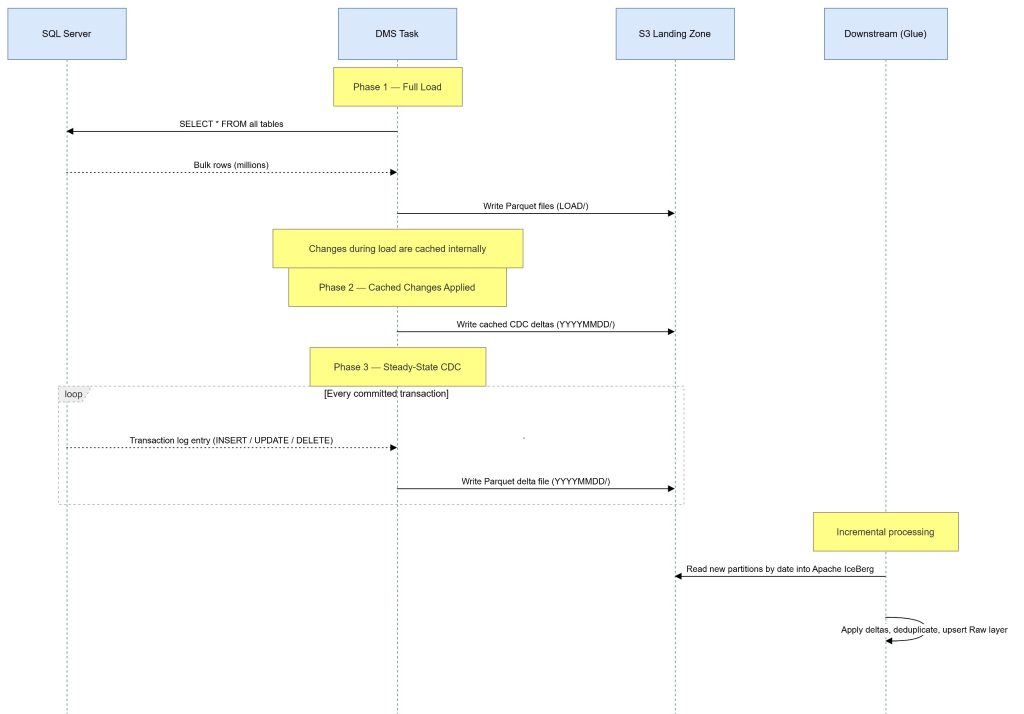
The key insight: you never need to re-run the full load unless you add new tables. CDC is self-healing – if the replication instance restarts, it picks up from the task’s checkpoint unless the “pause” time is greater than the CDC retention policy time.
IAM Configuration for AWS DMS
DMS has quirky IAM requirements:
Service-linked roles – two account-level roles must exist before creating a replication instance in a VPC: – dms-vpc-role – dms-cloudwatch-logs-role – Created once per account; import in CDK to avoid conflicts:
					const dmsVpcRole = iam.Role.fromRoleName(this, "DmsVpcRole", "dms-vpc-role");
const dmsCloudWatchRole = iam.Role.fromRoleName(
  this, "DmsCloudWatchLogsRole", "dms-cloudwatch-logs-role"
);
S3 target role – DMS needs an IAM role to write to S3: – iam_ prefix for roles (naming convention) – Scoped to only the landing bucket
					this.s3TargetRole = new iam.Role(this, "DmsS3TargetRole", {
  roleName: `iam_${prefix}-dms-s3-target-role`,
  assumedBy: new iam.ServicePrincipal("dms.amazonaws.com"),
});
landingBucket.grantReadWrite(this.s3TargetRole);
For the full list of DMS IAM prerequisites, see the AWS DMS IAM documentation.
Error Handling and Resilience
Production DMS tasks need thoughtful error handling. Our task settings:
- Data errors (DataErrorPolicy: “LOG_ERROR”) – log bad rows, don’t stop the task
- Table errors (TableErrorPolicy: “SUSPEND_TABLE”) – suspend the offending table, keep replicating others
- Task-level errors (TableErrorEscalationPolicy: “STOP_TASK”) – if too many tables fail, stop and alert
- Recoverable errors (RecoverableErrorCount: -1) – retry indefinitely with exponential backoff up to 30 minutes
This gives you a task that survives transient network blips and bad rows, but fails loudly when something is genuinely broken.
Deploying the AWS DMS CDC Stack
With the CDK stack in place, deployment is a single command:
DEPLOY_DATALAKE=true npx cdk deploy my-dev-datalake --profile <profile name>--region <AWS region> After deployment, update the SQL Server credentials in Secrets Manager:
aws secretsmanager put-secret-value \
  --secret-id my-dev-dms-erp1-credentials \
  --secret-string '{"username":"dms_user","password":"...","serverName":"sqlserver.internal","port":1433,"databaseName":"SOURCE_DB"}' \
  --profile myprofile --region ap-southeast-2
Then test the endpoints and start the task from the DMS console or CLI. The full load begins immediately.
Lessons Learned Running AWS DMS CDC in Production
- MS-CDC vs fn_dblog – Always use setUpMsCdcForTables=true. The privilege requirements for fn_dblog-only mode are a non-starter in most enterprise environments.
- Pin your engine version – DMS engine upgrades are not always backward compatible. Pin it in config and upgrade deliberately.
- Run pre-migration assessments – DMS has a built-in assessment feature. Run it before your first full load. It catches unsupported data types, missing CDC config, and permission issues.
- LOB columns need special handling – Large Object columns (TEXT, NTEXT, IMAGE, VARBINARY(MAX)) require LimitedSizeLobMode or FullLobMode. We use limited LOB mode with a 32KB cap, which covers 99% of real-world data.
- CloudWatch log groups must exist first – DMS fails silently if the log group doesn’t exist. Create it explicitly in CDK with a dependency on the replication instance.
What’s Next: From Landing Zone to Lakehouse
This landing zone is the foundation. Data flows through a medallion architecture:
- Bronze (Landing): Raw DMS Parquet files, date-partitioned, with operation columns intact
- Silver (Curated): Glue jobs apply CDC deltas, deduplicate, enforce schema
- Gold (Serving): Aggregated, business-ready datasets for analytics and ML
The landing zone is immutable and append-only. If a downstream transformation has a bug, replay from the raw DMS files without touching the source system.
Wrapping Up
AWS DMS with Full Load + CDC is one of the most reliable ways to get SQL Server data into a modern data lake. It’s not the simplest to configure – IAM quirks, CDC prerequisites, task settings JSON – but once running, it’s remarkably stable.
Codifying the entire setup in CDK means every environment gets an identical, auditable, version-controlled deployment. No more “it works in dev but not prod” because someone clicked something different in the console.
If you’re sitting on a SQL Server database that your analytics team can’t touch, this is the path forward.
Ready to Build Your Data Ingestion Pipeline?
The team at Cevo works with organisations across Australia to design and build modern data platforms on AWS – from DMS ingestion pipelines to full lakehouse architectures.

Mehul is a seasoned Senior AWS Data Consultant with over 18 years of experience spanning the banking, fintech, energy, and retail sectors. He specialises in data quality, security, and governance, and is known for his deep expertise in building robust, scalable data solutions. Outside of work, Mehul is an avid music enthusiast and passionate traveller. He has a strong drive for continuous learning and stays ahead of the curve by exploring emerging tools and technologies