TL;DR: We swapped out one catch-all AI assistant for four specialised agents: a planner, a builder, a tester, and a reviewer and knocked out a 13-ticket demo app in roughly four hours. It’s really just a practical mashup of spec-driven development and role-based agent. Speed wasn’t the main win. The real payoff is predictability since problems get caught as questions instead of bugs.
Table of Contents
Planning philosophy and agent architecture
We put together CevoMarket, a sample mobile marketplace, specifically to stress-test this staged, agent-heavy workflow on something real. The app itself doesn’t matter much, it’s a demo shell, deliberately kept small and self-contained so we could focus on the process. What actually matters is how we built it. One dev, thirteen tickets, about four hours of work, and a whole new way to approach AI-assisted planning, coding, testing and verification.
This is the first half of a two-part breakdown. I’m laying out the philosophy and the agent structure here. In [Part 2], we’ll walk through the build itself, show you the bugs the AI completely missed, and explain why that’s actually a feature, not a bug.
Standing on existing practice
The architecture I’m about to describe is popular in the AI world. It’s just a faithful take on patterns that have been settling into place across the industry over the last year or two. On the planning front, it follows the spec-driven development. On the execution side, it leans heavily on that coordinator/planner–implementor–verifier (CIV) split pattern that you’ve probably seen. If you’ve played with Spec Kit, had a tinker with Claude Code’s Plan Mode, or just read up on multi-agent “separation of powers,” a lot of this will feel familiar.
This blog is a first-person account of running it end-to-end on a real, working build, including the parts that didn’t work as cleanly as the diagrams suggest.
The lifecycle didn’t disappear, it just got redistributed
Typical software projects still move through the same old stages: planning, building, testing, and verification. We didn’t change the stages. We just changed who (or what) touches each one.
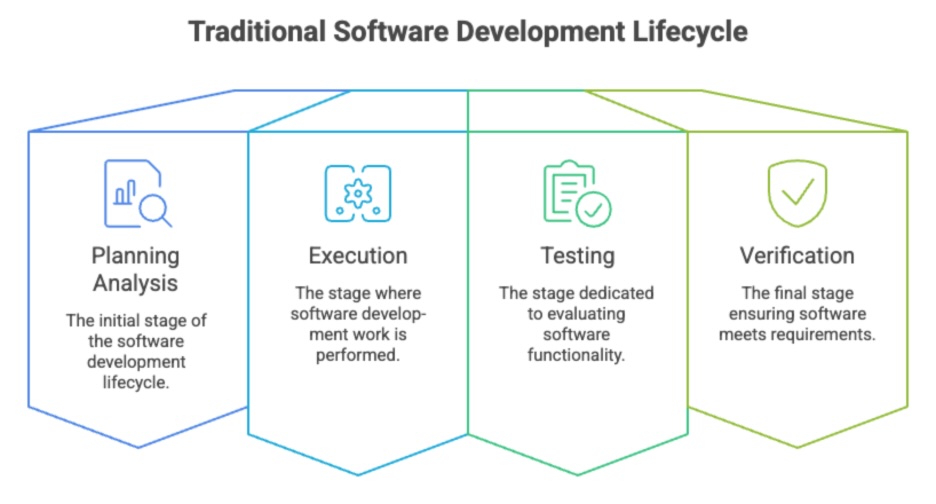
In a usual setup, you’ve got people wearing multiple hats across every phase. Product folks, analysts or architects handle planning, devs writing the code, QA runs the tests, and a stake holder signs off on releases. Even on a lean team, somebody has to physically do all that work.

AI doesn’t erase this lifecycle. It just piles up in the middle of it. Planning still starts and finishes with a human who actually owns the intent. Verification still ends with a human doing real checks, code reviews, security sweeps, final sign-offs: not just rubber-stamping a checkbox. The layer in between which is execution and automated testing? That’s where the agents do most of the heavy lifting. You steer instead of typing.
The short version: humans keep ownership of intent or the “why” and sign-off; AI concentrates in the build layer.
How the multi-agent loop actually runs
Instead of treating these as four separate tools you have to manually pass files between, we ran all four agents into two sessions. One session for planner agent, mobile dev agent and tester agent. Then another session* for the reviewer agent. They just took turns switching hats on the same task.

The loop, per ticket, looked like this:
Planner agent grills and plans, mobile dev agent builds, tester agent writes tests, reviewer agent* critiques, then back to the implementation agent with the review findings sent to the next task.
That review-fix cycle repeats until the reviewer comes back clean. Context carries automatically across each agent switch within the session, so there’s no manual copy-pasting of the plan or the ticket from one tool to another; the AI already knows what happened two “hats” ago.
Philosophy: plan first, “grill before you build”
The biggest shift for us was refusing to let anything jump straight into code, especially the changes that we thought had a big impact in the business logic or in the code. Every single task kicked off with some kind of planning or “grilling” session alongside an AI partner. We scaled the depth to match the work size, obviously. A massive epic got a long, multi-question interview. A tiny fix might just need one or two clarifying prompts before we touched anything.
Grilling isn’t about interrogation. It’s about building actual shared understanding between you and the AI before a single line of code gets written. In practice, that looks like this: the AI asks clarifying questions instead of guessing, you answer and lock in intent, and only then does the AI sketch out a scoped plan.

We found that grilling isn’t a one-time step at the start of a project; it’s a practice repeated at three different altitudes:
- Epic level: scoping decisions such as what’s in, what’s out, and what the open risks are. This is where a rough idea turns into a structured breakdown of tickets, each with story points, acceptance criteria, and even a drafted prompt for the implementation stage.
- Ticket level: a second, narrower grilling session right before coding starts on a specific ticket, since real requirements are always more granular than the epic-level overview suggested.
- Code level: the actual implementation conversation. Codebases move fast between tickets, so re-grounding against current reality at this level catches drift that the epic-level plan couldn’t have anticipated.

The planner agent takes in a bunch of different inputs at once:
- Designs – wireframes, sketches, mock-ups, flow diagrams
- Business requirements – docs laying out major decisions and constraints
- Existing source code – an accurate snapshot of what’s actually running right now
- Other contexts – PDFs, screenshots, markdown notes, meeting transcripts, API specs, etc.
All of that feeds into a collaborative discussion (the grilling session) to refine the approach, which finally spits out well-defined tasks. The AI reads through everything and questions back until the shared understanding is solid enough to actually write a plan.
One thing worth calling out: we do all our prompt engineering at planning time, not coding time. By the time a ticket was ready for the builder agent, the exact prompt to hand off had already been drafted and polished during grilling.
Tooling: purpose-built agents, not one general-purpose assistant
Rather than using a single AI assistant for everything, we set up a small set of purpose-built agents, each with a narrow role and its own tool permissions:
- The planner agent runs the ticket-level grilling interview, can peek at the codebase (status, diffs, logs, blame), but can’t write files or run mutating commands. Its only job is asking good questions and spitting out a plan. You’ve probably seen similar inquiry-driven tools before: Matt Pocock’s grill-me skill, Claude Code’s planner mode, AWS Kiro’s planner agent.
- The mobile developer agent is scoped tightly to the parts of the codebase that actually touch the source code. It can write files and run shell commands, but here’s the catch: every single write action and every live-inspection tool call requires manual approval. Nothing touches disk without you clicking “yes.”
- The tester agent writes and updates unit, component, and e2e tests. It also gets a live browser-inspection tool or other MCPs you may need so it can actually assert against what renders on screen, not just guess what the code implies should render.
- The reviewer agent scans the working diff, reports findings down to the file-and-line level, and suggests fixes.
The key design choice here was separation of powers: the agent that writes tests doesn’t get to silently mark them passing, and the agent that reviews code doesn’t get to quietly fix what it finds. Every correction has to flow back through the mobile developer agent, with a human still approving each write.
Costs and tradeoffs
There’s no free lunch! It’s worth naming the overhead honestly rather than letting the post read as if grilling and multi-agent review were costless additions:
- Grilling took real time, especially at the epic level. A ticket that could have been “vibe-coded” in one prompt sometimes took a multi-turn conversation before a single line of code was written. For small, unambiguous fixes, this occasionally felt like process for its own sake, and on a few tickets, we skipped ticket-level grilling entirely once the epic-level plan was specific enough.
- The review-fix loop can drag long. A ticket with a strict reviewer sometimes needed several rounds before coming back clean, which added latency even though it reduced the number of bugs that made it to a human.
- Someone still has to read the plan. Read-only planning doesn’t remove the human review step. It just shifts left. If nobody actually reads the grilling output critically, you’ve added a step without adding the shared understanding it’s meant to produce.
To be honest about the trade-off, you give up some speed in exchange for traceability and fewer trial and errors on non-trivial work. For small, low-risk changes, that’s often more process than the task needs, so scale it down instead of applying it everywhere.
Comparison with other methods
Using the staged, agent-driven process, the CevoMarket build (all 13 tickets, including grilling, coding, testing, and review) took roughly 4 hours. By comparison, the same build done with AI but skipping the staged process (a single “vibe coding” session with no clarifying questions or role separation) would likely take 4-8 hours, since the faster initial code generation is offset by rework once skipped decisions surface as bugs later. Done entirely without AI, by an experienced solo developer working through the same 13 tickets by hand, the estimate is roughly 24-38 hours, or 4-6 working days.
Speed was never really the headline result here. A single unstructured AI session could absolutely finish this build about as fast, sometimes faster, than the structured version did. What the structured process actually delivers is predictability: a number you can trust because the mistakes get caught while they’re still questions, not after they’ve been written into code.
In Part 2, that claim isn’t just asserted, it’s demonstrated: a contradiction the epic-level plan missed gets caught by ticket-level grilling before any code exists, and two real bugs get caught by a human in a real browser rather than shipped to users.
Further reading
How to use AI coding tools like a senior engineer: a closer look at the context engineering, spec-first workflows, and tool permissions that sit underneath the planner/reviewer split described above.

Warren is an experienced IT Consultant with over 15 years in Cloud and Software Engineering across APAC. At Cevo, he helps clients design and optimise AWS Cloud Solutions, driving innovation and scalability across marketplace, wayfinding, finance, insurance, fitness, and more through modern, cloud-native architectures.