
Windows Containers on ECS – Part 1

In this post, I’ll explore some of the ins and outs of running a containerised Windows workload on the AWS Elastic Container Service (ECS) platform.
5 DevOps things that have changed because of COVID-19

Thursday night 21st May 2020 saw the return of the DevOps Sydney meetup. This months meetup was the first since the working isolation has been enforced around Covid-19.
Review: The good, bad and ugly of Amazon Connect

I think Amazon Connect is a fantastic product, however being aware of some of its misgivings can help you better plan and design your solution to avoid any one way doors you might come across.
3 Things to Consider Before Starting Your Cloud Migration

In this post we look at the 3 key areas you need to consider before diving headlong into a cloud migration project.
3 Tips for Managing your AWS Landing Zone

The AWS Landing Zone is a great way to provision the foundation for your consumption of AWS, with guardrails and management via infrastructure as code.
Cloud Migration with VMC

To support migrations at scale and at pace, we’ve partnered with VMware to incorporate the VMware Cloud on AWS solution into our migration toolkit for those workloads that are just too hard to migrate and transform at the same time.
Talking Covid-19 with Amazon Lex

Over the last few days I have had a chance to play with Amazon Lex, and used the time to make a simple bot for the current hot topic – Covid 19 statistics.
OUR FIRST DRIVE OF AWS CHATBOT
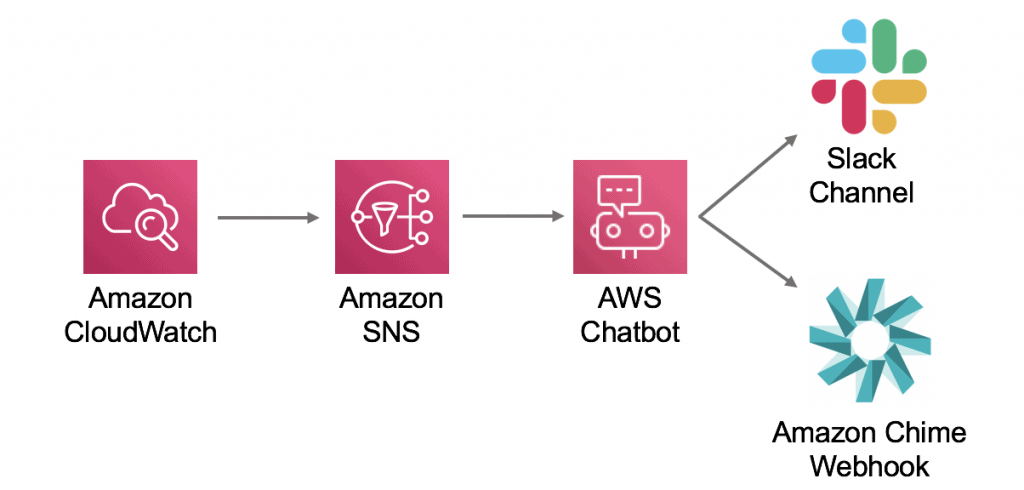
AWS recently announced ChatBot integration with Chime and Slack… let’s see how easy it is to set up and get running.
You’ve tried Amazon WorkSpaces; here are the questions you should ask before running at scale
Amazon WorkSpaces is a managed, secure Desktop-as-a-Service (DaaS) solution. As a remote or office-based worker, you can ‘remote desktop’ into your own Virtual Desktop Infrastructure (VDI) environment and work from wherever, on whatever local device you want.
AWS AppStream – Secure, High Performance Remote Work

Now that we’ve become remote workers by default, it’s no surprise that many teams are turning to Virtual Desktop Infrastructure (VDI) solutions to provide centralised, managed desktop experiences for day to day applications. But what if you don’t need a full desktop experience and, instead, just need to provide access to a single application (or a few pre-defined applications)?